22 · Execution State: Who Should See It?
Route plans, tool progress, background tasks, and resume summaries by source, audience, and lifetime instead of flooding one global surface.
Chapter brief
Question to answer
Which plans, tool progress, background state, and resume summaries belong to the model, user, parent agent, or logs?
By the end, you can
- Classify execution state by source, audience, and lifetime
- Prevent UI noise, context contamination, and incorrect reinjection
- Route visibility, persistence, and aggregation with typed events
- Read this now if
- Engineers designing agent UI, event buses, progress feedback, or parent-child communication
- Prerequisites
- Understand event streams, sessions, and task state
- Deliverable
- An execution-state routing matrix and event-ownership table
- Evidence boundary
- Visibility policy improves understanding and control but does not replace correctness or permission checks
Who should see execution state?
Section titled “Who should see execution state?”Scenario: a long-running tool emits ten heartbeats per second. The same event is copied into model context, user chat, operator panel, and durable log. Minutes later, progress noise fills the model window, the user sees hundreds of duplicates, and the audit log still lacks a final state.
Passing conditions: events declare source, audience, lifetime, priority, and correlation ID; the model receives only decision-relevant summaries; users see throttled milestones; operators can expand detail; audit preserves immutable key events; ephemeral heartbeat never reinjects by default.
Progress is not one field. Tool updates belong in a status surface, unfinished todos belong in resume context, and an away summary helps a user return. Merge them and both noise and misclassification increase.
Route by source and audience
Section titled “Route by source and audience”| Event | Main audience | Lifetime | Re-inject into model? |
|---|---|---|---|
| Approval plan | User | Until accepted or rejected | No |
| Execution todo | Agent and user | Current task | Yes, unfinished only |
| Tool progress | UI and operator | One tool call | Usually no |
| Task progress | UI and parent session | Background task | Summary only |
| Terminal status | User | Short-lived chrome | No |
| Away summary | User | One return prompt | No |
Codex exposes MCP progress as a protocol notification. Claude Code separates hook, tool, and task events. OpenClaw projects child-session progress to the parent. Hermes lets each platform choose off, new, all, or verbose. The shared idea is to separate display from fact.
Build a router that does not create noise
Section titled “Build a router that does not create noise”Each event needs source, surface, audience, lifetime, thread_id, turn_id, item_id, status, and an optional parent_id. Dedupe first, then project to UI, logs, or a resume summary.
Repeated polling, a silent child task, and an unchanged result should trigger a no-progress check. The source files show event shapes; without a runtime trace they do not prove that a system cannot hang.
Source notebook: implementation details
Section titled “Source notebook: implementation details”Source notebook: implementation details
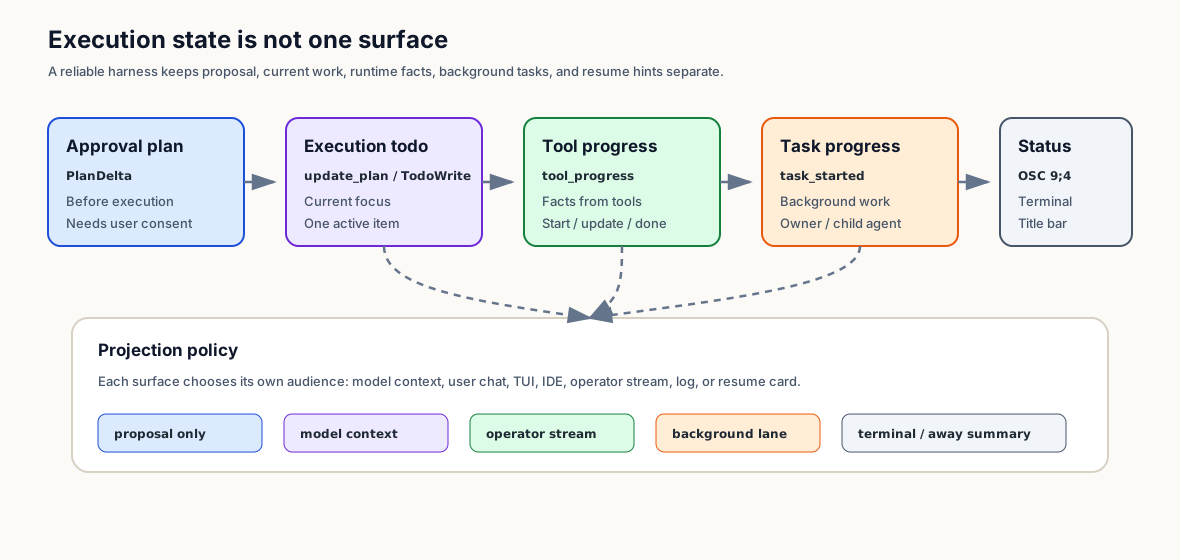
How four systems project execution state
Section titled “How four systems project execution state”Codex · prompt discipline, protocol events, terminal title
Section titled “Codex · prompt discipline, protocol events, terminal title”Codex separates two kinds of progress in its base instructions. The first is a natural-language update for long tasks: briefly tell the user what has been explored and what comes next.
The second is update_plan: a renderable checklist with one active step. These are related, but not interchangeable.
Codex codex/codex-rs/protocol/src/prompts/base_instructions/default.md:52-60, 173-175, 267-275 Codex defines both natural-language progress updates and update_plan checklist discipline.
Do not repeat the full contents of the plan after an `update_plan` call...## Sharing progress updates...There should always be exactly one `in_progress` stepCodex also has a third progress channel: MCP tool progress. App-server v2 defines McpToolCallProgressNotification with thread_id, turn_id, item_id, and message, and maps it to item/mcpToolCall/progress.
External MCP tools can report intermediate progress without waiting for the final tool result.
Codex codex/codex-rs/app-server-protocol/src/protocol/v2/mcp.rs:202-207 MCP tool progress is a first-class app-server v2 notification.
pub struct McpToolCallProgressNotification { pub thread_id: String, pub turn_id: String, pub item_id: String, pub message: String,}The TUI has another layer: TaskProgress is routed into the status line, preview item, and terminal title. That surface is for human awareness, not model context.
Claude Code · SDK event taxonomy, terminal progress, away summary
Section titled “Claude Code · SDK event taxonomy, terminal progress, away summary”Claude Code exposes a richer event taxonomy. The SDK schema includes hook_progress, tool_progress, task_started, and task_progress, which cover hook execution, tool execution, background task startup, usage, and summaries.
claude-code/src/entrypoints/sdk/coreSchemas.ts:1616-1657, 1715-1762 Claude Code models hook, tool, and background task progress separately.
subtype: z.literal('hook_progress')type: z.literal('tool_progress')subtype: z.literal('task_started')subtype: z.literal('task_progress')The remote-session path treats these as background-task lifecycle messages: task_started registers remote work, task_progress can be skipped or folded by the UI, and print.ts flushes or drains those SDK events so background-agent progress is not lost behind final output.
The terminal layer is separate again. useTerminalNotification.ts reports progress through OSC 9;4, terminal.ts checks terminal compatibility, and supportedSettings.ts exposes a user setting.
That state belongs to terminal chrome, not transcript state.
The away summary is a different surface. In the current Claude Code source, after the terminal is blurred for five minutes, no turn is running, and no summary exists since the last user turn, it generates one to three short sentences from the recent conversation. These are source thresholds, not a site-measured UX optimum.
It uses a small fast model, querySource: 'away_summary', and skipCacheWrite: true, which makes it a UI resume card rather than long-term memory.
OpenClaw · event projection and hidden boundaries
Section titled “OpenClaw · event projection and hidden boundaries”OpenClaw’s progress layer is an ACP runtime event stream. The translator emits tool_call with in_progress when a tool starts and tool_call_update when it completes or fails.
The auto-reply projector treats tool-call updates as hidden boundary tags by default and can edit a previous tool summary instead of flooding chat channels.
Child-session relay is also an execution-state surface. A spawned child announces that progress will stream back to the parent session, then child snippets are emitted with a progress context prefix.
This is fact propagation between sessions, not a model-maintained todo list.
Hermes · display policy is per platform
Section titled “Hermes · display policy is per platform”Hermes exposes tool_progress as a user-facing setting. CLI modes cycle through off, new, all, and verbose; new suppresses repeated adjacent tool names, while verbose shows full arguments and debugging detail.
The gateway /verbose command cycles the same setting per platform and writes it to display.platforms.<platform>.tool_progress.
Defaults differ by platform. CLI and API can tolerate more progress; chat platforms often need new or off; webhook defaults to quiet. API server streams tagged ("__tool_progress__", payload) tuples into SSE queues.
Progress density is a channel policy, not a global default.
What state surfaces already agree on
Section titled “What state surfaces already agree on”Every progress event needs a source. Model-authored todo, runtime tool fact, background task lifecycle, terminal chrome, and resume summary are not the same kind of truth.
Every surface needs an audience. Model context usually wants short and stable state; users want paced updates; operators can handle more detail; logs can retain full facts; terminal titles need very small strings. Validate the trade-off on the target channel.
Every surface needs a lifetime. Approval plans expire after approval; todos expire after completion; tool progress belongs in event logs; task progress may persist across processes; away summaries expire on the next user turn.
Progress display needs dedupe and no-progress detection. Hermes has new mode, OpenClaw can edit tool updates, and OpenClaw also detects tool loops and child sessions with no output.
Without that layer, a progress UI can simply make a stuck system look busy.
Trade transparency against noise
Section titled “Trade transparency against noise”Plan-first
- Good for high-risk approvals
- User can review before execution
- Proposal can stream
- Not real execution progress
- Must expire after approval
- Easy to confuse with checklists
Todo-first
- Fits a single-agent coding CLI current-focus surface
- Clear model focus
- Simple compaction recovery
- Weak tool-level detail
- Weak background-task semantics
- Can be marked done too early
Event-first
- Records tool and subagent facts directly
- Useful for operator UI
- Captures failure states
- Does not always express remaining semantic work
- Needs aggregation and dedupe
- Raw events are too noisy for prompts
Task-board-first
- Works for IDEs, teams, and background work
- Owner/blocker/claim is auditable
- Supports cross-process recovery when state, locks, and events persist
- High complexity
- Needs locks and migrations
- Overkill for current-focus todo
Status-card-first
- Good user experience
- Keeps transcript clean
- Works for terminal and resume flows
- Not a source of truth
- Cannot carry recovery alone
- Can summarize incorrectly
Routing principle: show information the user can act on first
Section titled “Routing principle: show information the user can act on first”Minimal implementation: keep the state surface actionable
Section titled “Minimal implementation: keep the state surface actionable”Execution State Router
最小可行
- Define a common event envelope: `source`, `surface`, `audience`, `lifetime`, `thread_id`, `turn_id`, `item_id`, `message`.
- Separate approval plan, execution todo, and tool progress from day one.
- Write a UI projection policy: show, hide, edit, log-only, or model-context summary.
- Inject only unfinished execution todos into resume / compaction context.
- Keep natural-language progress updates for long work, but do not treat them as durable state.
进阶
- Add MCP progress notifications so external tools can report intermediate state.
- Add background task events: `task_started`, `task_progress`, `task_completed`, `task_failed`.
- Add terminal/status surfaces such as title progress, status bar, or OSC 9;4, with a user setting.
- Add away/resume summaries that state the high-level task and next step, not raw log recaps.
- Add no-progress detectors for repeated polling, unchanged tool results, and silent child sessions.
一开始别做
- Do not merge plans, todos, tasks, and tool events into one global table.
- Do not inject raw tool progress into the model prompt.
- Do not default chat platforms to verbose tool-argument output.
- Do not write away summaries into long-term memory.
- Do not show progress without detecting stalls.
From event stream to interface
Section titled “From event stream to interface”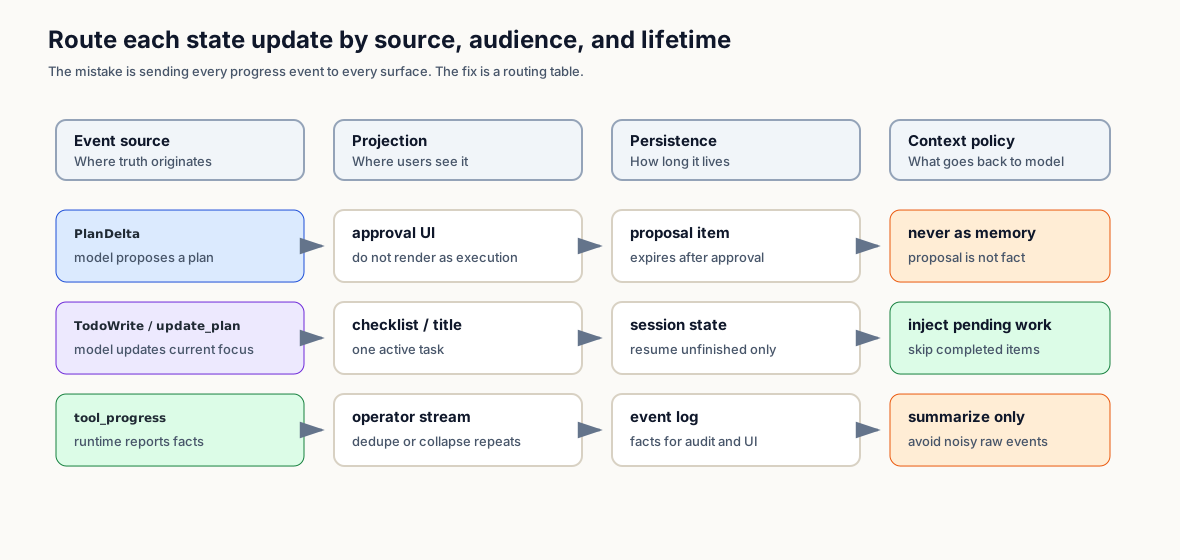
Follow state events through source
Section titled “Follow state events through source”What to carry forward and the next experiment
Section titled “What to carry forward and the next experiment”One fact should not broadcast to every surface. Route execution state by producer, consumer, lifetime, and decision impact; visibility, persistence, and reinjection are three separate choices.
Next experiment: generate 1,000 mixed events—heartbeats, tool start/end, approval, error, recovery, and final result. Verify minimal decision summaries for the model, milestones for users, causal detail for operators, and durable key states for audit. Measure context-token and UI-message reduction.
Appendix: exercises and review
Section titled “Appendix: exercises and review”Open the exercises and ten review questions
Exercises
Section titled “Exercises”- Draw six state surfaces for an existing agent: approval plan, execution todo, tool progress, task progress, terminal/status, resume summary.
- Write a projection policy table: visible to user, log-only, model-context summary, expiration rule.
- Simulate 20 repeated polling events and verify the UI collapses repeats and emits a no-progress warning.
- Simulate a user returning after five minutes away and generate a one-to-three sentence away summary.
- Add progress notification support to one external MCP tool and ensure the model sees only a summary, not raw progress spam.
Review questions
Section titled “Review questions”Q1 · Concept: How is an execution-state surface different from a todo list?
A todo list is one execution-state surface: the current execution focus. Execution-state surfaces also include approval plans, tool progress, background task progress, MCP progress, terminal status, and away summaries.
The distinction is source and audience. A todo is usually model-maintained and may re-enter context. Tool progress comes from runtime facts and is primarily for UI or operators.
Away summary helps a returning user, not the agent’s task truth.
Q2 · Design: Why not merge Plan, Todo, and Task into one table?
They have different lifetimes. A plan is a pre-execution proposal. A todo is current execution focus. A task is durable background or team work with owners, blockers, locks, and retries.
Merging them causes predictable bugs: unapproved proposals look like progress, completed todos re-enter context, or simple CLIs inherit task-board complexity they do not need.
Q3 · Protocol: How does MCP progress differ from a tool result?
The tool result is terminal output. MCP progress is an intermediate notification. Codex app-server v2 gives MCP progress a dedicated McpToolCallProgressNotification and item/mcpToolCall/progress event name.
Slow tools can report indexing, downloading, or querying while running. The model usually needs the final result or summary, not every raw progress message.
Q4 · UX: Why should terminal progress not enter the transcript?
Terminal titles, status bars, and OSC 9;4 are chrome. They reduce waiting uncertainty for humans but are not semantic conversation content.
If they enter the transcript, compaction and resume can mistake transient UI state for task meaning.
Q5 · Resume: How is away summary different from compaction summary?
Away summary is for the user returning to the terminal: one to three sentences about the high-level task and next step. Compaction summary is for the model: unfinished tasks, constraints, tool results, and current intent.
Claude Code uses a small fast model, recent messages, querySource: 'away_summary', and skipCacheWrite, which makes it a UI resume card rather than long-term memory.
Q6 · Operator: Why does a multi-channel agent need per-platform progress settings?
Terminals and APIs can tolerate more progress detail. Chat channels get noisy fast. Webhooks often need final-only behavior. Hermes handles this with off/new/all/verbose and per-platform defaults.
One global default either starves CLI users of useful state or floods chat users with tool spam.
Q7 · Subagents: Should subagent progress be Todo or Task Progress?
The child agent lifecycle should be task progress: started, progress, completed, failed, cancelled. The parent agent’s remaining work can still have a todo item like “wait for review subagent”.
Keep the two layers separate so child tool events do not pollute parent todos and late child completions do not disturb a finished parent answer.
Q8 · Failure: Why is showing progress not enough?
A progress UI can faithfully show that the system is stuck: same tool, same args, same result, or a silent child session.
Progress surfaces need no-progress detection: repeat folding, no-output timers, unchanged-result circuit breakers, and polling-loop warnings.
Q9 · Prompt: Which state should re-enter model context?
State usually worth re-entering model context is unfinished execution todo, terminal task result, summarized tool facts, and the latest user intent. Raw tool progress, terminal chrome, completed todos, and unapproved plans usually stay out; validate the allowlist against resume traces.
The prompt should carry stable continuation state, not UI noise.
Q10 · Implementation: What fields does a minimal execution-state router need?
Start with an example envelope containing source, surface, audience, lifetime, thread_id, turn_id, item_id, message, status, and optional parent_id; adapt it to the projection and recovery contract.
That is enough for UI projection, resume filtering, source-based audit, and parent/child task aggregation.