13 · What the Sandbox Must Contain
Choose boundaries for files, network, syscalls, and privilege, then decide what containers should own
Chapter brief
Question to answer
Which file, network, syscall, and identity boundaries must the sandbox enforce instead of trusting the agent?
By the end, you can
- Choose file, network, process, and syscall isolation by asset and attack surface
- Separate policy checks, runtime sandboxes, and container boundaries
- Test escape, mounts, network egress, and resource exhaustion
- Read this now if
- Engineers choosing containers, Seatbelt, Landlock, Seccomp, or remote execution
- Prerequisites
- Understand operating-system privilege and shell-execution risk
- Deliverable
- A task-tiered sandbox profile and escape-test plan
- Evidence boundary
- A sandbox is not a complete security system; kernels, container config, secrets, and external services remain separate risks
A sandbox limits side effects
Section titled “A sandbox limits side effects”Scenario: a task claims to read source only, but the agent runs npm install; a dependency’s postinstall reads ~/.ssh and reaches the public network. Or a workspace symlink writes outside the allowed directory. Restricting tool names or the project path does not cover the real side effects.
Passing conditions: file policy applies to resolved paths; network and unrelated credentials are absent by default; child processes, syscalls, CPU, memory, and disk are bounded; installation and execution use different profiles; every denial maps to an explicit policy.
First list the side effects to contain
Section titled “First list the side effects to contain”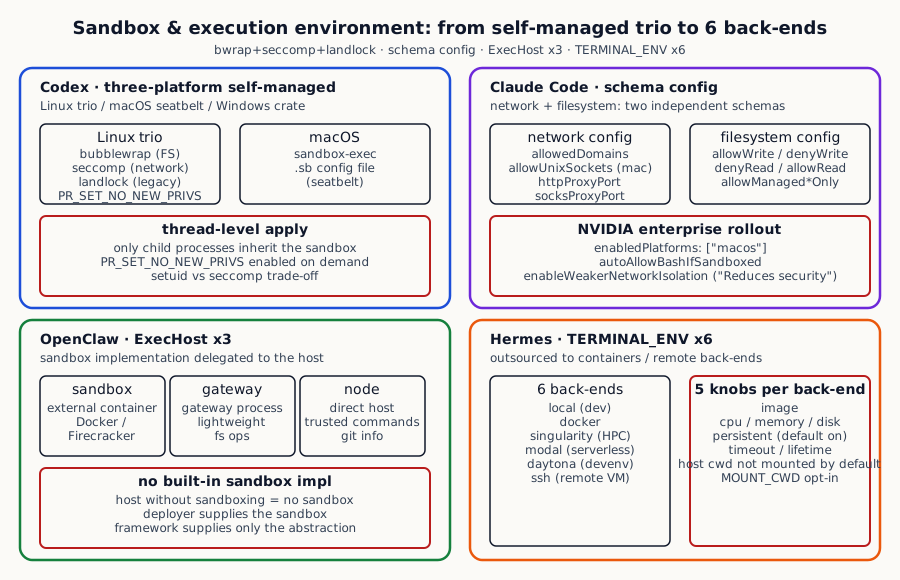
How the four systems cover five sandbox-critical concerns:
| Dimension | Codex | Claude Code | OpenClaw | Hermes |
|---|---|---|---|---|
| Sandbox infrastructure | Linux: bubblewrap + seccomp + landlock; macOS: seatbelt; Windows: separate crate | macOS: seatbelt; Linux: newer (introduced for the NVIDIA enterprise rollout); optional `enabledPlatforms` restricts where sandbox starts | `ExecHost` 3 backends: sandbox / gateway / node, with sandbox routed to an external container | 6 backends: local / docker / singularity / modal / daytona / ssh; toggled via TERMINAL_ENV |
| Filesystem isolation | `PermissionProfile.file_system`: writable_roots / read_only / full; bubblewrap enforces this path | `SandboxFilesystemConfig`: allowWrite / denyWrite / denyRead / allowRead / allowManagedReadPathsOnly | Decided by the backend process (the host contract determines enforcement) | Containers can provide a boundary, but mounts change the result; optional `TERMINAL_DOCKER_MOUNT_CWD_TO_WORKSPACE` maps cwd to /workspace |
| Network isolation | seccomp filter blocks connect() / sendto(); managed proxy can be carved out | `SandboxNetworkConfig`: allowedDomains / allowUnixSockets / httpProxyPort / socksProxyPort; macOS-only allowUnixSockets | Decided by backend / network policy | Container network-mode controls; ssh routes through real remote network |
| Permission model | `PR_SET_NO_NEW_PRIVS` + seccomp BPF; applied to the current thread, inherited by child | allowedDomains merge with permission rules; managed-only mode ignores user-layer rules | Per-binary `SafeBinProfile` (covered in Shell Execution) + ExecHost isolation | Relies on backend isolation (container / VM / SSH); no app-level seccomp / landlock |
| Failure handling | Sandbox failure -> SandboxErr; upstream decides fail_open / fail_closed | `failIfUnavailable: true` -> fail at startup; false -> warn and run unsandboxed | Backend spawn failure -> falls back to approval | Backend unavailable -> prompt user to switch TERMINAL_ENV |
Source evidence: kernel, configuration, and host
Section titled “Source evidence: kernel, configuration, and host”Codex · On Linux, combining three independent kernel isolation capabilities, each doing what it does best
Section titled “Codex · On Linux, combining three independent kernel isolation capabilities, each doing what it does best”Local isolation has to cover files, network, and syscalls; one switch rarely describes all three. Codex combines bubblewrap, seccomp, and landlock on Linux and keeps separate macOS and Windows paths. Control comes with maintenance work.
Its reasoning: every operating system offers several distinct isolation capabilities, each focused on a different problem class (filesystem, network, syscalls), and combining them can be more precise than any single solution.
The cost is having to write a separate code path for each platform (one for Linux, one for macOS, one for Windows); the payoff is a genuinely trustworthy isolation boundary.
On Linux, Codex stacks three independent kernel capabilities, each doing what it does best:
Codex codex/codex-rs/linux-sandbox/src/landlock.rs:1-70 Linux sandbox: bubblewrap does the FS work, seccomp blocks the network, landlock is the backup
//! In-process Linux sandbox primitives: `no_new_privs` and seccomp.//!//! Filesystem restrictions are enforced by bubblewrap in `linux_run_main`.//! Landlock helpers remain available here as legacy/backup utilities.
/// Apply sandbox policies inside this thread so only the child inherits/// them, not the entire CLI process.////// This function is responsible for:/// - enabling `PR_SET_NO_NEW_PRIVS` when restrictions apply, and/// - installing the network seccomp filter when network access is disabled.////// Filesystem restrictions are intentionally handled by bubblewrap.pub(crate) fn apply_permission_profile_to_current_thread(    permission_profile: &PermissionProfile,    cwd: &Path,    apply_landlock_fs: bool,    allow_network_for_proxy: bool,    proxy_routed_network: bool,) -> Result<()> {    let (file_system_sandbox_policy, network_sandbox_policy) =        permission_profile.to_runtime_permissions();    let network_seccomp_mode = network_seccomp_mode(        network_sandbox_policy,        allow_network_for_proxy,        proxy_routed_network,    );
    // `PR_SET_NO_NEW_PRIVS` is required for seccomp, but it also prevents    // setuid privilege elevation. Many `bwrap` deployments rely on setuid, so    // we avoid this unless we need seccomp or we are explicitly using the    // legacy Landlock filesystem pipeline.    if network_seccomp_mode.is_some()        || (apply_landlock_fs && !file_system_sandbox_policy.has_full_disk_write_access())    {        set_no_new_privs()?;    }
    if let Some(mode) = network_seccomp_mode {        install_network_seccomp_filter_on_current_thread(mode)?;    }    // ...
Each of the three layers plays a specific role:
bubblewrap (bwrap for short) is a lightweight user-space containerization tool focused on filesystem mount isolation. It can mount a host directory read-only into the sandbox, mount another writable, mount a tmpfs (in-memory, gone after exit). This is the workhorse of Codex’s Linux sandbox: almost all filesystem isolation work goes through it. The upside is it does not need special kernel support, just a normal binary; the downside is it depends on Linux namespace capabilities, so environments without namespaces (some container-in-container scenarios) cannot use it.
seccomp is a Linux kernel facility that lets userspace register a BPF bytecode as a “system-call filter”: every time a process issues a syscall, the kernel first runs that BPF to decide “is this call allowed”. Codex uses it for one very focused thing: at thread granularity, blocking network-related syscalls (connect(), sendto()) so the process is fundamentally incapable of opening any network connection. The “thread granularity” detail matters here. The Codex main process itself can still hit the network (to call OpenAI), but the child processes it spawns for user tools inherit the filter and cannot reach out.
landlock is a Linux Security Module introduced in Linux 5.13+, also for filesystem access control, but a newer kernel mechanism than bubblewrap. Codex treats it as a legacy/backup layer, with the main path still on bubblewrap, mainly because bubblewrap also runs on older kernels, giving better compatibility coverage.
There is a comment in the code about a trade-off that is worth reading carefully: the PR_SET_NO_NEW_PRIVS prctl is a hard prerequisite for enabling seccomp (the kernel requires it: “if you want to install a syscall filter, you must promise that this process and its descendants can never gain new privileges through setuid”), but that promise also defeats setuid promotion, and many bubblewrap deployments rely on setuid so unprivileged users can create namespaces.
Codex handles this conservatively: it sets PR_SET_NO_NEW_PRIVS only when seccomp is genuinely needed or when landlock filesystem isolation is in play, and skips it otherwise so the bwrap setuid path still works.
This is a concrete security-versus-compatibility trade-off; the safe setting still needs compatibility tests on the supported platforms.
For cross-platform breakdown: Linux uses the linux-sandbox/ crate plus the bubblewrap binary; macOS uses sandbox-exec (the so-called “seatbelt”) with .sb policy files, riding on the macOS native sandboxing mechanism;
Windows ships a dedicated windows-sandbox-rs/ crate paired with setuid user management.
Claude Code · Make the sandbox a JSON schema that IT admins can configure precisely
Section titled “Claude Code · Make the sandbox a JSON schema that IT admins can configure precisely”Enterprise deployment often needs a configuration surface that admins can review. Claude Code exposes network and filesystem schemas and labels weaker network isolation as an option; configuration alone is not an isolation test.
Concretely: model the whole sandbox as a JSON schema and let admins configure it declaratively in settings.json:
Claude Code claude-code/src/entrypoints/sandboxTypes.ts:90-145 SandboxSettings top-level: enabled + failIfUnavailable + platform restrictions + weaker-mode fallbacks
export const SandboxSettingsSchema = lazySchema(() => z .object({ enabled: z.boolean().optional(), failIfUnavailable: z .boolean() .optional() .describe( 'Exit with an error at startup if sandbox.enabled is true but the sandbox cannot start ' + '(missing dependencies, unsupported platform, or platform not in enabledPlatforms). ' + 'When false (default), a warning is shown and commands run unsandboxed. ' + 'Intended for managed-settings deployments that require sandboxing as a hard gate.', ), // Note: enabledPlatforms is an undocumented setting read via .passthrough() // Added to unblock NVIDIA enterprise rollout: they want to enable // autoAllowBashIfSandboxed but only on macOS initially, since Linux/WSL // sandbox support is newer and less battle-tested. autoAllowBashIfSandboxed: z.boolean().optional(), allowUnsandboxedCommands: z .boolean() .optional() .describe( 'Allow commands to run outside the sandbox via the dangerouslyDisableSandbox parameter. ' + 'When false, the dangerouslyDisableSandbox parameter is completely ignored and all commands must run sandboxed. ' + 'Default: true.', ), network: SandboxNetworkConfigSchema(), filesystem: SandboxFilesystemConfigSchema(), ignoreViolations: z.record(z.string(), z.array(z.string())).optional(), enableWeakerNestedSandbox: z.boolean().optional(), enableWeakerNetworkIsolation: z .boolean() .optional() .describe( 'macOS only: Allow access to com.apple.trustd.agent in the sandbox. ' + 'Needed for Go-based CLI tools (gh, gcloud, terraform, etc.) to verify TLS certificates ' + 'when using httpProxyPort with a MITM proxy and custom CA. ' + '**Reduces security** — opens a potential data exfiltration vector through the trustd service. Default: false', ), // ... }) .passthrough(),)Two annotations in this schema deserve special attention, because they show levels of engineering transparency rare in production code:
The first is the enabledPlatforms field, with a comment that literally states: “This setting is undocumented, read via .passthrough(), and was added to unblock NVIDIA enterprise rollout; they want to enable autoAllowBashIfSandboxed on macOS first, since the Linux/WSL sandbox is newer and less battle-tested.” Translation: NVIDIA’s IT team approached the Claude Code team and said “we want to roll Claude Code out to engineers, but we are only confident in the macOS sandbox right now, the Linux one is too new; give us a knob to flip macOS on first and leave Linux off”.
The Claude Code team did not push back with “the Linux sandbox is fine, you should trust it”. Instead they added a config knob, but on purpose did not document it (to avoid muddying the matrix for other users).
This kind of “carve a path for a specific enterprise customer’s specific concern” is exactly how real enterprise software works, but very rarely does the code admit it in plain text.
The second is enableWeakerNetworkIsolation. The comment is honest to the point of bluntness: “Allow access to com.apple.trustd.agent in the sandbox.
Needed for Go tools (gh, gcloud, terraform) to verify TLS via an MITM proxy with a custom CA. Reduces security, opens a potential data exfiltration vector through the trustd service.
Default: false.” Translation: lots of enterprises put corporate certs into an MITM proxy so they can inspect outbound traffic, but Go’s TLS stack will not trust the cert unless it can talk to macOS’s trustd service.
So the Claude Code team added a knob to allow it, while explicitly noting “this weakens security and opens an exfiltration vector”. It does not pretend this is “safe”.
It tells the user “you have made a security trade-off; make sure you know what it is”.
Beyond these two design highlights, Claude Code exposes separate network and filesystem schemas: network includes dimensions such as allowedDomains, managed-only rules, Unix sockets, and proxy ports; filesystem includes allow/deny read and write paths. The schemas are separate, but the resulting boundary still depends on the host and mounts.
These two “Managed Only” knobs carry a very stern management-plane stance: when they are on, every user-level setting is ignored, only the admin’s policySettings count.
This kind of “I, the IT admin, can rip the steering wheel out of the user’s hands” capability is the floor of any enterprise deployment.
OpenClaw · Sandbox is an abstract enum, not a specific technology; the deployer decides the implementation
Section titled “OpenClaw · Sandbox is an abstract enum, not a specific technology; the deployer decides the implementation”A platform framework cannot know every host. OpenClaw models sandbox, gateway, and node with ExecHost and lets deployment code enforce the boundary; an unenforced host gives the enum no protective effect.
Reasoning: different deployment environments use wildly different isolation technologies (Docker, Firecracker, gVisor, Lambda Functions, custom container runtimes), and an agent framework hard-coding one of them constrains its deployment flexibility.
So OpenClaw introduces a single enum to abstract the execution environment:
export type ExecHost = "sandbox" | "gateway" | "node";These three values represent three execution tiers: sandbox runs commands in an isolated execution environment (the deployer decides whether that means Docker, Firecracker, or Lambda;
OpenClaw does not prescribe); gateway runs in the gateway process itself, suitable for very lightweight operations like reading a file; node runs directly on the host node, suitable for fully trusted operations like reading git info.
This approach has clear benefits and costs. The benefit is total decoupling between sandbox implementation and agent logic: you can deploy OpenClaw inside Docker on a developer laptop, behind Firecracker microVMs on a serverless platform, in vanilla LXC on traditional servers; the agent logic itself does not care.
The cost is that OpenClaw does not ship a working sandbox. The deployer has to bring their own isolation infrastructure, otherwise that sandbox execution mode is just an empty enum value with no actual isolation.
This is a typical “framework vs product” trade-off: OpenClaw positions itself as a framework, leaving operational details to the deployer.
Hermes · Don’t sandbox at all; delegate isolation entirely to one of 6 containerization options
Section titled “Hermes · Don’t sandbox at all; delegate isolation entirely to one of 6 containerization options”Hermes delegates execution to TERMINAL_ENV backends. Local, Docker, remote containers, and SSH each carry a different boundary; the agent selects a backend, while its configuration owns the security check.
The user picks the right backend for their deployment scenario, and Hermes adapts. The six backends cover almost every realistic deployment shape:
Hermes hermes-agent/tools/terminal_tool.py:765-820 TERMINAL_ENV 6 backends + per-backend config: image / cpu / memory / disk / persistent
def _get_env_config() -> Dict[str, Any]:    """Get terminal environment configuration from environment variables."""    # Default image with Python and Node.js for maximum compatibility    default_image = "nikolaik/python-nodejs:python3.11-nodejs20"    env_type = os.getenv("TERMINAL_ENV", "local")
    mount_docker_cwd = os.getenv("TERMINAL_DOCKER_MOUNT_CWD_TO_WORKSPACE", "false").lower() in ("true", "1", "yes")
    # Default cwd: local uses the host's current directory, everything    # else starts in the user's home (~ resolves to whatever account    # is running inside the container/remote).    if env_type == "local":        default_cwd = os.getcwd()    elif env_type == "ssh":        default_cwd = "~"    else:        default_cwd = "/root"
    # ...    return {        "env_type": env_type,        "modal_mode": coerce_modal_mode(os.getenv("TERMINAL_MODAL_MODE", "auto")),        "docker_image": os.getenv("TERMINAL_DOCKER_IMAGE", default_image),        "singularity_image": os.getenv("TERMINAL_SINGULARITY_IMAGE", f"docker://{default_image}"),        "modal_image": os.getenv("TERMINAL_MODAL_IMAGE", default_image),        "daytona_image": os.getenv("TERMINAL_DAYTONA_IMAGE", default_image),        # ...        "container_cpu": _parse_env_var("TERMINAL_CONTAINER_CPU", "1", float, "number"),        "container_memory": _parse_env_var("TERMINAL_CONTAINER_MEMORY", "5120"),     # MB (default 5GB)        "container_disk": _parse_env_var("TERMINAL_CONTAINER_DISK", "51200"),        # MB (default 50GB)        "container_persistent": os.getenv("TERMINAL_CONTAINER_PERSISTENT", "true").lower() in ("true", "1", "yes"),        # ...    }
Each backend is good at something different and is the right answer for a different deployment context:
local means no isolation: every command runs directly on the developer’s machine, which can be convenient when the developer trusts the agent. docker is local Docker; its boundary and reproducibility depend on daemon, image, and mount settings. singularity is common in HPC environments where cluster policy may prefer rootless containers. modal is Modal.com’s serverless container service for burst workloads. daytona is a remote dev-environment service. ssh sends execution to a remote machine, so the trust and failure boundary moves to that host. Select among them from the deployment contract, not from a universal ranking.
Each backend has 5 independent config dimensions: image (container image, defaults to a Python+Node base, covering most agent needs), cpu (CPU limit, defaults to 1 core), memory (memory limit, defaults to 5GB), disk (disk limit, defaults to 50GB), persistent (whether to persist the container between commands).
That last one deserves special attention. When TERMINAL_CONTAINER_PERSISTENT=true (the default), one session reuses one container across multiple commands and avoids recreating the environment. When false, each command starts a fresh container and inherits less state from the prior command, but overall isolation still depends on mounts, network, identity, and cleanup policy.
Another detail is mount_docker_cwd. It defaults to off, meaning by default Hermes does not mount the host’s current working directory into the container, so the agent inside the container cannot directly touch the developer’s working files.
Only when the user explicitly sets TERMINAL_DOCKER_MOUNT_CWD_TO_WORKSPACE=true does the host’s /Users/xxx/repo get mounted at /workspace inside the container.
This is an explicit secure-default trade-off in the cited configuration: convenience requires an opt-in mount, while the effective boundary still depends on the container runtime and policy.
Invariants shared by isolation layers
Section titled “Invariants shared by isolation layers”The four source snapshots differ sharply in implementation depth, but the following three boundary questions recur. They are this article’s synthesis of those snapshots, not proof that every sandbox already satisfies an industry-wide invariant.
The first question is how sandbox failure becomes visible. Codex defines a dedicated SandboxErr error type so an upstream caller can decide whether to fail open or closed. Claude Code exposes failIfUnavailable. OpenClaw’s backend path can return to an approval decision, while Hermes can prompt the user to switch TERMINAL_ENV. These are distinct failure contracts, not one universal fallback policy.
The second question is how network and filesystem boundaries compose. Restricting filesystem writes does not prevent outbound traffic, and blocking network access does not protect mounted host files. The cited implementations express the dimensions at different depths: Codex separates file_system and network in PermissionProfile; Claude Code has separate network and filesystem schemas; OpenClaw combines ExecHost with network policy; Hermes relies on container mounts and network mode.
The third question is how platform differences remain explicit. Codex has platform-specific implementations, Claude Code exposes enabledPlatforms, Hermes selects among execution backends, and OpenClaw delegates enforcement to the host. A shared API can hide calling conventions, but each operating system and backend still needs an explicit capability statement and test matrix.
Choose isolation by side effect
Section titled “Choose isolation by side effect”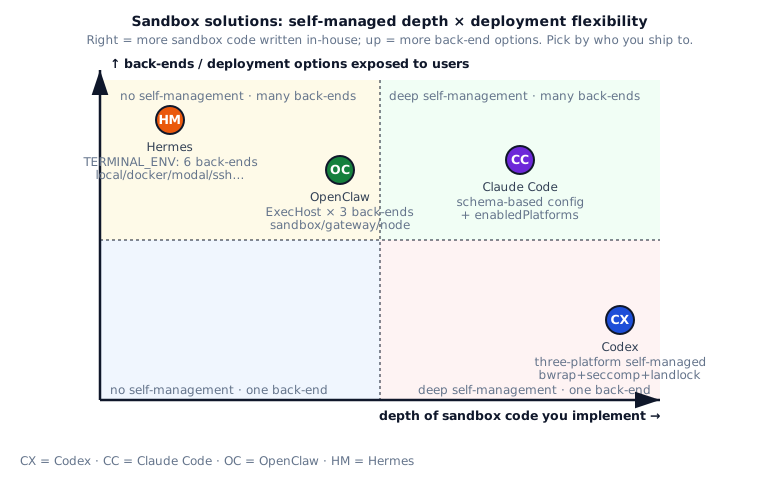
While the agreements above represent the floor, the divergences show how the four read the engineering trade-offs differently. Looking at it through “what kind of agent are you building”, the choices map onto four very different scenarios.
For a security-first desktop agent, Codex’s in-house path is a candidate to evaluate. It avoids assuming Docker or a remote service, at the cost of maintaining platform-specific code and escape tests. The threat model and supported host matrix decide whether that cost is justified.
For an enterprise IDE deployment (e.g. an IT department rolling Claude Code out to thousands of engineers), Claude Code’s schema-driven config is the reference. The reasoning: in this scenario, the highest-priority concern is not “is the sandbox cool” but “can IT admins precisely control its behaviour”. Claude Code’s full-schema approach is exactly this. IT admins write a JSON file declaring “allowed domains, allowed paths, which platforms turn it on, which weaker modes are enabled”, then push that JSON to every developer’s machine via the management plane. enabledPlatforms and allowManagedDomainsOnly are both knobs designed for this scenario.
For a SaaS deployment (e.g. an agent serving thousands of users in the cloud), Hermes’s 6-backend container outsourcing is the engineering-grade choice. The reasoning: in this scenario, the agent itself runs in the cloud, the cloud has mature containerization infrastructure (Kubernetes, Docker, modal, etc.), and writing your own application-layer sandbox is reinventing the wheel. It is writing it worse, since real cloud isolation depends on hypervisor and namespace mechanisms most application-layer sandboxes cannot reach. Hermes’s TERMINAL_ENV with its 6 backends maps onto this directly: pick the right containerization tier for your cloud (modal for serverless, docker for traditional, ssh for hybrid).
If you are building an agent framework rather than an agent product, OpenClaw’s ExecHost abstraction is worth borrowing. The reasoning: a framework cannot prescribe the deployer’s isolation infrastructure. Different deployers will pick different technologies (Docker, Firecracker, Lambda, custom containers), and the framework’s job is to provide a clean abstraction so all of these can plug in. OpenClaw’s ExecHost is exactly this: a 3-tier enum, plug in whatever you have.
Choice: isolate by default; open with evidence
Section titled “Choice: isolate by default; open with evidence”There is no star rating here. Choose isolation by the side effects you must contain and the layers you can maintain.
| Constraint | Start with | Cost or boundary |
|---|---|---|
| The local runtime must restrict files, network, and syscalls | Codex bubblewrap, seccomp, landlock, and platform paths | Kernel and platform compatibility become your work |
| IT needs a configuration surface for file and network policy | Claude Code schema and platform switches | Relaxed settings need an explicit security note |
| A deployment already provides Docker or Firecracker | OpenClaw ExecHost contract | No enforcement in the host means no sandbox |
| Execution belongs in local or cloud containers | Hermes TERMINAL_ENV backends | The boundary follows the backend and remote trust |
Build the smallest execution sandbox
Section titled “Build the smallest execution sandbox”Below is a starting checklist from the cited implementations. Define the side effects to contain, then add platform enforcement, failure handling, and escape tests.
Build recipe
最小可行
- On Linux use bubblewrap binary for FS isolation (borrow from Codex): read-only / writable / tmpfs three mount methods, external process enforces boundary; it reduces custom namespace + chroot work but still needs kernel and deployment validation
- Use seccomp BPF to block connect/sendto (borrow from Codex): apply at thread level so child inherits; seccomp is lighter than iptables (no root), but requires familiarity with BPF bytecode
- On macOS go with sandbox-exec + .sb config files: macOS doesn't support bubblewrap / seccomp but has seatbelt (sandbox) + sandbox-exec command; write .sb config (based on SchemeML) describing permission boundary
- Make fail_open vs fail_closed a config (borrow from Claude Code's failIfUnavailable): an interactive environment that treats sandboxing as a supplemental guard may warn and degrade; a managed environment whose policy makes sandboxing a hard gate should reject unsandboxed execution
进阶
- Keep platform enforcement and tests separate (borrow from Codex): linux-sandbox (bubblewrap + seccomp) / macOS seatbelt path / windows-sandbox-rs, while sharing the calling contract
- Put PR_SET_NO_NEW_PRIVS vs setuid trade-off in comments (borrow from Codex): this flag prevents setuid escalation but also breaks sudo / mount and other tools needing setuid; not always-on, enable on demand and document trade-off
- enabledPlatforms option (borrow from Claude Code): let admins enable sandbox on macOS + pause on Linux (if Linux's bubblewrap still has issues), per-platform rollout safer than one-size-fits-all
- allowManagedDomainsOnly / allowManagedReadPathsOnly (borrow from Claude Code): managed-only mode ignores user-layer config (user's "allow github.com" ignored), only uses domain whitelist pushed down by enterprise admin; this matters for large enterprise SSO integration
- enableWeakerXxx config explicitly labeled "Reduces security" (borrow from Claude Code): let users see in schema this is a flag with safety cost (not a normal flag), naturally think twice when deciding
- ExecHost abstraction (borrow from OpenClaw): decouple sandbox from agent; agent calls ExecHost.run({argv}), deployer decides whether ExecHost is docker / firecracker / native sandbox / cloud sandbox; this matters for SaaS / multi-tenant
- Six backends switching (borrow from Hermes' TERMINAL_ENV=local/docker/singularity/modal/daytona/ssh): covers diverse deployment needs (local with docker / cloud with modal / academic with singularity / production with daytona / remote machine with ssh)
- Make persistent containers configurable (borrow from Hermes' TERMINAL_CONTAINER_PERSISTENT): session reuse reduces repeated startup but carries file and process state; choose the default from short-command timing and cross-task contamination tests
- Do not mount host cwd by default (borrow from Hermes): require explicit TERMINAL_DOCKER_MOUNT_CWD_TO_WORKSPACE. This reduces host-file exposure but does not make a container escape harmless; audit daemon, mount, and runtime privileges
一开始别做
- Don't assume sandbox is always available: bubblewrap not in PATH (minimalist Linux) / docker daemon not running / seatbelt unsupported macOS version (very old) all need handling; fail_open vs fail_closed decision must be explicit
- Don't mount user home in the sandbox: default should be cwd + ephemeral tmpfs, not ~ (mounting home equals exposing ~/.ssh / ~/.aws and other sensitive files to in-sandbox processes)
- Don't let network pass through by default: seccomp blocking connect is default behavior; if agent needs internet should go through proxy (explicitly enable via proxy_routed_network), let traffic be proxy-audited
- Don't ignore setuid trade-off: PR_SET_NO_NEW_PRIVS breaks tools depending on setuid (sudo / mount / ping etc.); if user's build flow depends on these tools use cautiously
- Don't hard-code "secure": enterprise deployments often need enableWeaker* flags (e.g. some team needs sandbox-internal access to git ssh but default not allowed), add to schema but label cost ("Reduces security") so users know
Put isolation differences back in deployment context
Section titled “Put isolation differences back in deployment context”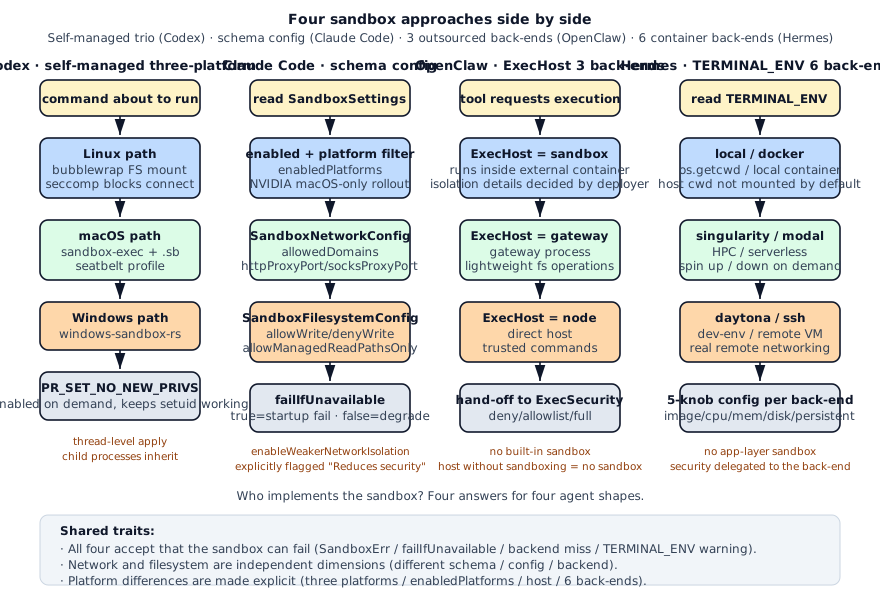
Lined up, the “who owns sandbox implementation” answer differs sharply: Codex builds it, Claude Code lets IT configure it, OpenClaw lets the host decide, Hermes ships it to containers / remote backends.
How to verify isolation boundaries and fallback paths
Section titled “How to verify isolation boundaries and fallback paths”What to carry forward and the next experiment
Section titled “What to carry forward and the next experiment”A sandbox isolates assets and side effects, not commands that merely look dangerous. Model files, network, processes, syscalls, credentials, and resource budgets separately; containers also need explicit mounts and egress instead of acting as a synonym for safety.
Next experiment: build an escape suite covering symlinks, ../, postinstall, home-directory reads, metadata service, fork bomb, disk fill, background processes, and signal handling. Record the blocking layer, host impact, and whether logs explain denial. Do not claim isolation on a target platform before running that suite.
Appendix: exercises and review
Section titled “Appendix: exercises and review”Open the exercises and ten review questions
Exercises
Section titled “Exercises”- Easy: run
echounder bubblewrap. Write a script usingbwrap --ro-bind /usr /usr --tmpfs /tmp -- echo hito verify basic isolation. - Medium: block
connect()via seccomp. Write a Python program usingpython-prctl+ a seccomp filter to blockconnect(2). Verify:curl example.comfails,ls /tmpsucceeds. - Medium: multi-backend dispatch. Implement
run_terminal(cmd, env_type)with env_type in{local, docker, ssh}. docker usesdocker run, ssh usesssh user@host. Verify: when env_type=docker,pwdreturns the container path. - Hard: enabledPlatforms gating. Implement
should_enable_sandbox(settings)so the sandbox is enabled only when the current platform is insettings.enabledPlatforms. Verify: enabledPlatforms=[“macos”] returns false on Linux.
Review questions
Section titled “Review questions”Q1 · Concept: bubblewrap, seccomp, and landlock - what’s each tool’s boundary?
Codex uses all three on Linux, with completely different purposes:
bubblewrap (bwrap): user-space containerization. Reassembles the root filesystem: --ro-bind mounts read-only, --bind makes writable, --tmpfs creates ephemeral dirs, --proc mounts /proc. The workhorse for FS isolation. Acts like a “mini Docker” but uses Linux user namespaces + mount namespaces - no daemon needed.
seccomp: kernel-level BPF syscall filter. Codex uses it to block connect() / sendto() and stop network access. It filters syscall numbers, not IPs/ports (that’s netfilter/iptables territory). Once enabled, seccomp is irrevocable, so it’s applied at thread level for precise child inheritance.
landlock: Linux 5.13+ LSM (Linux Security Module) for FS access control. Different mechanism from bubblewrap: bubblewrap remounts, landlock intercepts syscalls in the kernel. Codex treats it as legacy/backup; the main path is bubblewrap. Reasons: landlock missing on older kernels; bubblewrap in user space needs no kernel version support.
How they cooperate:
bwrap (FS mount isolation) └─ seccomp BPF (block connect/sendto) └─ landlock (backup FS control, older kernel fallback)Three layers stacked, each defends a different escape path. If bwrap is bypassed, seccomp still blocks network; seccomp can’t manage FS, so bwrap/landlock cover that.
Follow-up: “Why not Docker?” Docker needs a daemon + root + image management. bubblewrap is a setuid binary, no root needed, single-binary start/stop, much lighter. Codex is a CLI tool, startup overhead matters.
Q2 · Concept: Why does Claude Code’s enableWeakerNetworkIsolation comment literally say “Reduces security”?
This is the classic “knob with a cost” design. Concrete scenario:
Go tools (gh / gcloud / terraform / aws-cli) in a sandbox using MITM proxy + custom CA need com.apple.trustd.agent (macOS system service) to validate TLS certificates.
But trustd itself can be abused for data exfiltration (forwarding malicious payloads through Apple system services).
Claude Code’s choice:
- Block trustd (default) → Go tools fail behind MITM proxy → enterprise users who need gh/gcloud are stuck
- Allow trustd → Go tools work → extra data exfiltration vector
Neither is perfect. So it ships as enableWeakerNetworkIsolation config + comment that explicitly says “Reduces security”, telling users that enabling this drops the security tier - it’s not “turn on and forget.”
The essence of this design:
Doesn’t pretend “one config switch fixes everything.” Acknowledges trade-offs exist, lets users make the call explicitly.
The comment lives in the Zod schema; when docs auto-generate, the warning syncs into settings.json hover hints in the IDE.
Similar “weaker” knobs: enableWeakerNestedSandbox (allows nested sandboxes, bypassing some restrictions). Both prefixed with “weaker” so IDE auto-completion flags them as security-sensitive at a glance.
Follow-up: “Should this trade-off note live in schema or docs?” In the schema. IDE auto-completion and settings.json hover hints pull from schema comments. If only in external docs, users enable the flag without reading. Put the warning closest to the trigger point.
Source: claude-code/src/entrypoints/sandboxTypes.ts:90-160.
Q3 · Architecture: What’s the real trade-off behind Hermes’s 6 backends?
6 backends isn’t showmanship. Each maps to a real deployment shape:
| Backend | Additional startup path | Isolation boundary | Typical scenario |
|---|---|---|---|
| local | No container startup | Same as the host process | Trusted dev-machine debugging |
| docker | Create or reuse a local container | Depends on container config | Local long runs |
| singularity | Create or reuse a local container | Depends on cluster policy | HPC clusters / research |
| modal | Schedule a remote container | Depends on cloud config | Serverless on-demand |
| daytona | Schedule a remote dev environment | Depends on the remote environment | Dev-env-as-a-service |
| ssh | Network connection and remote shell | Depends on the remote host | Self-owned dev VM |
Why so many?
Different deployment shapes have different trade-offs:
- Dev machine: needs speed, no isolation → local
- Demo / teaching: needs reproducibility, consistent env → docker
- Research: HPC clusters only allow singularity → singularity
- CI / short tasks: on-demand start + cleanup-on-finish → modal
- Team collaboration: each dev gets independent dev env → daytona
- Enterprise internal: existing dev VMs → ssh
With only local and Docker, HPC, remote dev environments, and existing VMs still need separate adapters. Six backends reduce that integration work; they do not provide six equally strong isolation boundaries.
Each backend has 5 config dimensions (image/cpu/mem/disk/persistent):
- image: per-backend image config (singularity uses
docker://imageconversion, modal reads docker image directly) - persistent=true: same container reused within a session, pay startup once. Cleaned up at session end.
- persistent=false: create a new container per command. This reduces inherited state between commands but repeats backend startup or scheduling work. Measure the latency in the target environment.
Follow-up: “Six backends, isn’t the maintenance burden huge?” Modal and Daytona have Python SDKs; Docker, Singularity, and SSH can use existing CLIs. Hermes centralizes dispatch, but the project still owns version compatibility, authentication, failure recovery, and cleanup.
Q4 · Concept: Why doesn’t OpenClaw provide a sandbox implementation itself?
OpenClaw positions itself as “enterprise SaaS agent platform,” not “desktop tool.” This positioning drives the sandbox design:
Why not build their own?
- Enterprises already have infrastructure. SaaS companies use Kubernetes / Firecracker / Lambda / EC2. OpenClaw provides ExecHost abstraction so customers pick existing isolation.
- Multi-cloud diversity. AWS / GCP / Azure / private cloud sandbox approaches differ. If OpenClaw built one, it’d couple to every cloud. Abstract it out, let hosts implement, zero cross-cloud code changes.
- Specialists do specialist work. Firecracker (AWS Lambda’s foundation) specializes in lightweight VM isolation, way better than an agent team writing one. Delegating to infrastructure is more reliable.
Downsides:
- Small users with no infrastructure are stuck. A single dev installs OpenClaw without K8s/Firecracker → sandbox tier equals no sandbox. OpenClaw docs need to be clear.
- “Where is the sandbox” is opaque to users. Looking at OpenClaw code, you can’t see how sandbox is actually enforced. Easy to think “I thought I had sandbox, but I don’t.”
Why is this reasonable?
This source snapshot exposes a host-enforced path for managed or enterprise deployments; it does not show that every OpenClaw user already has isolation infrastructure. Whether to use the ExecHost abstraction depends on available container or remote-execution capabilities, target platforms, and operating boundaries.
Benefit of abstraction: sandbox becomes a swappable concern, like “which LLM” or “which frontend UI.” OpenClaw extracts all 27-cell ExecHost/ExecSecurity/ExecAsk = “I provide the decision framework, you provide the implementation.”
Source: openclaw/src/infra/exec-host.ts + infra/exec-approvals.ts.
Follow-up: “If I’m starting an agent startup, should I learn this from OpenClaw?” Phase it: MVP - clone Codex with embedded bubblewrap (turnkey for users). Commercializing to enterprise - extract ExecHost abstraction. Integrate first, decouple later.
Q5 · Engineering: Why does seccomp apply at thread level instead of process level?
Codex uses apply_permission_profile_to_current_thread() instead of process-wide. Reasons:
1. Precise child inheritance on fork. seccomp’s semantics: “current thread + fork’s child processes inherit.” Codex’s workflow:
agent main process └─ fork a thread to prepare execution └─ apply seccomp on this thread └─ exec user command (child inherits thread's seccomp)Other main-process threads (event loop / IPC / logging) aren’t affected by seccomp. Only the thread “about to execute user command” gets the shackles.
2. PR_SET_NO_NEW_PRIVS cost.
seccomp requires PR_SET_NO_NEW_PRIVS to be set first, which blocks setuid escalation. But bubblewrap itself is a setuid binary (depends on escalation for user namespace mount).
So Codex must let bwrap run first, then apply seccomp in bwrap’s child. If seccomp applies in main process:
- main process can’t setuid → bwrap fails to launch → chain breaks
- or: main process starts bwrap later but bwrap already handled prctl
Thread-level apply keeps them independent: bwrap runs in fresh thread (no NO_NEW_PRIVS), seccomp applies in user command thread.
3. Easier testing / debugging.
Process-wide seccomp blocks debuggers / strace / log syscalls. Thread-level keeps other threads working.
Linux docs verbatim:
A process can apply seccomp filters in one thread; the filter will apply to that thread and any child threads/processes created via fork()/clone().
Codex exploits this semantic.
Follow-up: “How does Python do it?” Python uses prctl + seccomp libs, but Python’s main thread runs the GIL, so thread-level apply is meaningless. Python agent sandboxes typically fork-exec and apply in the child process. CPython’s multiprocessing is another path.
Source: codex/codex-rs/linux-sandbox/src/landlock.rs:60-130.
Q6 · Real-world: Adding sandbox to your agent, zero to production?
Advance through five scopes: baseline → filesystem isolation → network boundary → schema → multi-backend. Gate each scope with threat vectors and cleanup fixtures.
Stage 1 · no-sandbox baseline
def run_command_unsafe(cmd: list[str]) -> str: return subprocess.check_output(cmd)Run a representative set of real scenarios, log cmd stats, and identify which commands need blocking:
- Network access (curl / wget / pip install online)
- FS writes (rm / mv / any -o output file)
- Interpreter exec (python / node / bash -c)
Acceptance gate: freeze the baseline trace with explicit allow/block expectations for network, filesystem writes, and interpreter execution.
Stage 2 · bubblewrap filesystem isolation
Prerequisite: the baseline lists paths and commands that require isolation.
def run_command_sandboxed(cmd: list[str], cwd: Path, writable: list[Path]) -> str: bwrap_args = [ "bwrap", "--ro-bind", "/usr", "/usr", "--ro-bind", "/etc", "/etc", "--tmpfs", "/tmp", "--proc", "/proc", "--dev", "/dev", ] for w in writable: bwrap_args += ["--bind", str(w), str(w)] bwrap_args += ["--chdir", str(cwd), "--"] bwrap_args += cmd return subprocess.check_output(bwrap_args)Borrow Codex’s bubblewrap style. FS default read-only, writable paths explicitly listed.
Acceptance gate: read-only mounts, explicit writable paths, temporary directories, and cwd match a fixed fixture, with mounts cleaned after exit.
Stage 3 · seccomp network boundary
Prerequisite: filesystem isolation passes and the threat model names the syscalls or namespaces to block.
import ctypes
def install_network_seccomp():    libc = ctypes.CDLL("libc.so.6")    PR_SET_NO_NEW_PRIVS = 38    libc.prctl(PR_SET_NO_NEW_PRIVS, 1, 0, 0, 0)    # Install BPF filter blocking SYS_connect / SYS_sendto
Or simpler: bwrap --unshare-net directly disables network namespace, no seccomp needed.
Acceptance gate: network allow/block behavior and child-process inheritance are tested, and mandatory policy failures cannot silently fall back.
Stage 4 · schema config
Prerequisite: backend capabilities and fail-open/closed policy are expressed in the schema.
class SandboxConfig(BaseModel):    enabled: bool = True    fail_if_unavailable: bool = False    network_allowed_domains: list[str] = []    fs_writable: list[Path] = []    fs_read_only: list[Path] = []
def run_with_config(cmd, config: SandboxConfig):    if not config.enabled:        return run_command_unsafe(cmd)    try:        return run_command_sandboxed(cmd, config)    except SandboxUnavailable:        if config.fail_if_unavailable:            raise        warn("Sandbox unavailable, running unsandboxed")        return run_command_unsafe(cmd)
Borrow Claude Code failIfUnavailable.
Acceptance gate: config validation, unavailable backends, warnings, and error propagation have contract tests; defaults never widen permissions.
Stage 5 · multi-backend switching (when needed)
Prerequisite: real deployments require a backend beyond local, container, or remote baseline.
class Backend(Enum):    LOCAL = "local"    BWRAP = "bwrap"    DOCKER = "docker"    SSH = "ssh"
BACKENDS = {    Backend.LOCAL: run_command_unsafe,    Backend.BWRAP: run_with_bwrap,    Backend.DOCKER: run_with_docker,    Backend.SSH: run_with_ssh,}
def run(cmd, backend: Backend, **opts):    return BACKENDS[backend](cmd, **opts)
Borrow Hermes TERMINAL_ENV.
Acceptance gate: switching, cleanup, unavailable-backend fallback, and error formatting replay in each target environment.
Key takeaways:
- Start with bwrap: validate filesystem mounts, networking, and child-process boundaries first; add seccomp or landlock only when the threat model calls for them
- Schema early: user config > hardcoded values
- fail_open vs fail_closed: explicit, never default
- Multi-backend only for enterprise: self/MVP, bwrap-only works
Follow-up: “Mac / Windows?” Mac uses sandbox-exec (built-in) + write .sb files. Windows uses Windows Sandbox API (Pro version required) or Docker Desktop directly. Codex’s three-platform code is the reference.
Q7 · Concept: Is failIfUnavailable: false degrading to “no sandbox + warning” an anti-pattern?
Not necessarily. The deciding question is whether sandboxing is a supplemental guard or a mandatory control in the current policy.
When can fail_open be appropriate?
Local interactive environments may lack bubblewrap or an available Windows Sandbox. When the threat model permits unsandboxed work, fail_open + warning can preserve the workflow, but the product must expose the missing protection prominently and narrow high-risk tools.
When is fail_closed required?
When an organization defines sandboxing as a mandatory control, a missing dependency should block startup or execution rather than degrade silently. failIfUnavailable: true expresses that hard-gate policy; a “production” label alone does not determine the answer.
Claude Code’s comment states the intent:
When false (default), a warning is shown and commands run unsandboxed. Intended for managed-settings deployments that require sandboxing as a hard gate.
One bool can carry both policies, but its default must come from the threat model and deployment policy.
Practical advice:
Supplemental-guard policy: fail_open = true + prominent warning + narrower tool scopeMandatory-isolation policy: fail_open = false + enforced via policySettingsCI / automation: decide from runner trust boundaries; isolation-required jobs set fail_open=falseAnti-pattern versions:
- ❌ Global fail_closed → dev pain
- ❌ Global fail_open → prod risk
- ❌ No warning → users don’t know there’s no sandbox
- ❌ Warning in debug logs only → users miss it
Whether the product uses a startup banner, status surface, or command result, the warning should be visible before execution rather than buried in debug logs.
Source: claude-code/src/entrypoints/sandboxTypes.ts:120-135.
Follow-up: “fail_open=true, why not disable all side-effect tools?” That also blocks common development actions such as npm install and git pull. One auditable compromise is a narrower tool allowlist plus a prominent unsandboxed-state warning.
Q8 · Concept: Decoupling sandbox from permission approval - benefits and costs?
Chapter 12 covers permission approval, chapter 13 covers sandbox. These two are easy to confuse.
Their essence differs:
- Permission approval: “Should I let agent do this?” (human decision)
- Sandbox: “Even if agent does this, how much damage can it cause?” (technical constraint)
Decoupling benefits:
- Independent evolution: tweaking approval policy doesn’t touch sandbox. Adding “audit mode” (log all commands without prompts) only touches approval layer, sandbox code unchanged.
- Different failure dimensions: approval pass ≠ sandbox safe. Maybe user approved
rm -rf /tmp/some_specific_file, sandbox still has to verify/tmp/some_specific_fileis in writable_roots. - Independently testable: approval can be pure unit tested, sandbox needs real syscalls.
Codex’s approach:
agent → approval layer → permission_profile → sandbox layer → exec (writable_roots / network policy etc.)permission_profile concretely expresses “what was approved,” sandbox enforces. Clear separation.
Decoupling costs:
- Larger config surface: users configure approval rules AND sandbox policy. Easy redundancy / drift.
- Cognitive load: “Why did sandbox block me even though I approved?” needs docs to explain.
- Plumbing between the two: approval layer outputs permission_profile, sandbox layer consumes it. Codex uses
to_runtime_permissions()conversion functions.
OpenClaw chooses “semi-decouple”: ExecHost is both approval dimension (host decides decisions) and sandbox dimension (decides actual execution location). One enum manages both. Simpler config, but trade-off: “sandbox implementation” is opaque to users.
Fits:
- Complex enterprise → decoupled (Codex / Claude Code)
- Simple SaaS → semi-decoupled (OpenClaw)
- Personal agent → integrated (Hermes treats sandbox as backend choice)
Follow-up: “How do the two layers coordinate in real engineering?” Schema as contract: approval layer outputs PermissionProfile, sandbox layer consumes PermissionProfile. Schema is the contract, both layers evolve independently with backward compat.
Q9 · Engineering: persistent containers default on; how should throughput and isolation be traded?
There is no context-free answer. persistent=true reuses an environment; persistent=false reduces state inherited across commands. In multi-tenant systems, first verify that a session actually belongs to one tenant.
Two choices compared:
| Strategy | Startup cost | Isolation | State isolation |
|---|---|---|---|
| persistent=true (default) | Once per session | Medium | Shared within session |
| persistent=false | Once per command | Depends on backend policy | Does not inherit the prior command’s container state |
Why default to persistent=true?
- Agent workflows are continuous: a task may run
cd repo && npm install && npm run build && npm test. A new container per command repeats startup and environment preparation; the added latency depends on the backend and image cache. - State sharing can be a workflow requirement:
npm installinstalls dependencies that the nextnpm testneeds. A per-command environment must persist dependencies or workspace state another way. - A session can be an isolation unit, but only after verification: it forms a boundary when sessions bind to one tenant or task, cleanup actually removes the container, and mounts do not leak state.
Why provide persistent=false option?
- Audit / forensics scenarios: Forensic analysis needs each command to run in clean env, preventing prior contamination.
- CI scenarios: Each step is an independent container, matching GitHub Actions.
- Multi-tenant agents: Strict isolation needed between users/orgs.
Deployment starting points to validate:
- Personal dev / self-use: persistent=true default
- Team collaboration: persistent=true, restart session per task
- SaaS multi-tenant: rebuild per tenant or task and verify cleanup; persistent=false is only one control
- CI / automation: persistent=false aligned with step boundaries
Follow-up: “How can an attacker exploit persistent=true?” If user A’s task leaves files in a container and user B’s task later reads them, state crosses tenant boundaries. Multi-tenant deployments should rebuild environments per tenant or task and test cleanup; persistent=false alone does not prove isolation.
Source: hermes-agent/tools/terminal_tool.py:230-270 (container lifecycle).
Q10 · Open-ended: Design a composable sandbox from a threat model and provide its verification matrix.
6-layer API, opt-in:
Layer 1 · Backend enum (mandatory)
enum SandboxBackend { None = 'none', Bwrap = 'bwrap', Seatbelt = 'seatbelt', WindowsSandbox = 'windows-sandbox', Docker = 'docker', Modal = 'modal', SSH = 'ssh',}Borrow Codex three-platform + Hermes 6 backends.
Layer 2 · Platform filtering (mandatory)
interface SandboxConfig {  enabled: boolean;  failIfUnavailable: boolean;  enabledPlatforms: Platform[];  backend: SandboxBackend;}
function selectBackend(config: SandboxConfig): SandboxBackend | null {  if (!config.enabled) return null;  const platform = currentPlatform();  if (config.enabledPlatforms.length && !config.enabledPlatforms.includes(platform)) {    return null;  }  return config.backend;}
Layer 3 · Filesystem config (mandatory)
interface SandboxFilesystemConfig { allowWrite: string[]; denyWrite: string[]; allowRead: string[]; denyRead: string[]; allowManagedReadPathsOnly: boolean; // borrow from Claude Code: ignore user-layer}Layer 4 · Network config (mandatory)
interface SandboxNetworkConfig { enabled: boolean; allowedDomains: string[]; allowedPorts: number[]; httpProxyPort?: number; enableWeakerNetworkIsolation: boolean; // borrow from Claude Code: explicit cost label}Layer 5 · Backend config (optional)
interface DockerBackendConfig {  image: string;  cpu: number;  memory: string;  disk: string;  persistent: boolean;            // borrow from Hermes  mountCwdToWorkspace: boolean;   // borrow from Hermes: default false}
interface SSHBackendConfig {  host: string;  user: string;  port: number;  cwd: string;}
Layer 6 · Failure handling (mandatory)
function runSandboxed(cmd: string[], config: SandboxConfig): Result { const backend = selectBackend(config); if (!backend) { if (config.failIfUnavailable) throw new SandboxUnavailable("backend not selected"); warn("Sandbox unavailable, running unsandboxed"); return runUnsandboxed(cmd); } try { return BACKENDS[backend].run(cmd, config); } catch (e: SandboxUnavailable) { if (config.failIfUnavailable) throw e; warn(`Sandbox ${backend} failed: ${e}, running unsandboxed`); return runUnsandboxed(cmd); }}Borrow Claude Code failIfUnavailable + Codex SandboxErr.
Contributions per system:
- Codex: three-platform separation + thread-level apply + seccomp/landlock division
- Claude Code: schema config + enabledPlatforms + enableWeaker* trade-off labeling
- OpenClaw: ExecHost abstraction + decoupling from permission approval
- Hermes: 6 backends + per-backend 5-dim config + persistent default
Evaluate by scope:
- Layers 1-3 · one backend and its boundary: define mounts, networking, child processes, and the unavailable-backend policy first. Gate: a fixed command set verifies read/write paths, network vectors, and child-process boundaries while recording sandbox verdicts.
- Layers 4-5 · schema and backend selection: add only when configuration must span platforms or deployment shapes. Prerequisite: every backend has a capability and failure contract; gate: the same fixture verifies fail-open/closed behavior, cleanup, and error propagation on target platforms.
- Layer 6 · multi-backend operations: add only when real deployments require container, remote, or HPC backends. Prerequisite: each backend has threat vectors and cleanup tests; gate: switching, unavailable-backend fallback, and resource cleanup are replayable.
Key decisions:
- First batch: 3 backends: use bwrap, Docker, and SSH to validate local, container, and remote deployment shapes; measure coverage against real user tasks
- Schema early: just use Zod / pydantic
- fail_open default + policy override: only where unsandboxed fallback is allowed; hard-gate policies choose closed
- Choose persistence from state requirements: multi-tenant systems rebuild per tenant or task and verify cleanup rather than relying on one boolean
Follow-up: “Cross-language sharing?” Schema in JSON Schema, codegen types; backend implementations per-language (Rust writes Codex bubblewrap wrapper, Python writes Hermes docker wrapper). Protocol shared across languages, implementations stay independent.
Source mosaic (proposal): Codex linux-sandbox/ → Claude Code entrypoints/sandboxTypes.ts → OpenClaw infra/exec-host.ts → Hermes tools/terminal_tool.py. Reconcile the contract, threat model, and test matrix before calling this a framework.